
Shopify Bundles vs Bundly: Is the Free App Enough?
Shopify’s free Bundles app is enough if you sell fixed bundles and multipacks: you decide every product, each bundle fits within 3 options, and you are fine updating bundle prices by hand. You need a paid app such as Bundly when customers choose the products themselves, as in “pick any 5 teas for $30” or a build-your-own box, when a bundle needs more than 3 options, or when you want the bundle price to follow your product prices.
Shopify gives every store a free bundle app. Shopify Bundles is built by Shopify, lives in your admin, and builds fixed bundles and multipacks with real-time inventory. Bundly is our app, and it costs $29 a month. This page answers a narrower question than “which is better”: where the free app stops, and whether what’s on the other side of that line is worth paying for in your store.
We tested Shopify Bundles on our own store in September 2026. Ratings and prices are from the App Store on October 30, 2026.
The Quick Verdict
Shopify Bundles: the right choice when you decide every product in the set, your products have simple option structures, and you want to pay nothing.
Bundly: the right choice when customers choose what goes in the bundle, when your products have more sizes and colours than the native app allows, when you want the bundle price to follow your product prices, or when you want to track bundle views, component selections, and add-to-cart rates.
If you can describe every bundle you want to sell as “these exact products, in these quantities,” start with the free app. If any of your bundles begins with “customers pick,” keep reading.
Shopify Bundles vs Bundly: Side by Side
Shopify Bundles | Bundly | |
|---|---|---|
Price | Free on all Shopify plans | $29/mo (Basic) or $59/mo (Standard), flat, unlimited sales, 14-day trial |
Bundle types | Fixed bundles and multipacks | Mix-and-match, multi-step builders, curated (fixed) sets |
Who picks the products | You do; customers pick variants (size, colour) only | Customers pick products and variants, within rules you set (“any 5”, “2 to 4”, “up to 1, optional”) |
Options and variants per bundle | 3 options, hard cap; variants up to Shopify’s normal product limit (2,048) | No limit; each product in the bundle keeps all its own options and variants |
Components per bundle | Up to 30 | Up to 128 configured components, each a product or a whole collection |
Bundle pricing | You type the price by hand; it doesn’t update when component prices change | Percentage off, fixed amount off, set price, or component total, calculated from current component prices |
Built-in component-page upsell | No | Yes |
Cart detection | No | Yes, optional per bundle |
Analytics | Sales tiles in the app (bundle total sales, bundle orders, top sellers) plus Shopify reports | Sales reports per store and per bundle, plus a storefront funnel (views, selections, add-to-cart rate) |
Rating (Oct 2026) | 2.8 (571 reviews) | 4.9 (67 reviews) |
Some things the table can’t hold in a cell:
Inventory works the same way. Both apps are built on Shopify’s bundles framework, so the bundle is a container and both use component inventory rather than maintaining independent bundle stock. There’s no sync job to drift. Shopify’s availability calculation skips components that aren’t tracked or are allowed to sell when out of stock, so keep tracking on for every component in either app. Several paid apps in this category still model the bundle as a separate product with its own stock number; these two don’t.
Languages. Shopify Bundles’ admin is translated into 20 languages. Bundly’s admin is English only; its storefront widget is translated into more than 30 languages, so customers are covered and your team may not be.
Subscriptions, pre-orders, and nested bundles are off the table for both of these apps. Shopify’s bundle considerations state that bundles built on its bundles framework aren’t compatible with purchase options, custom products, or other bundles.
What Shopify Bundles Does Well
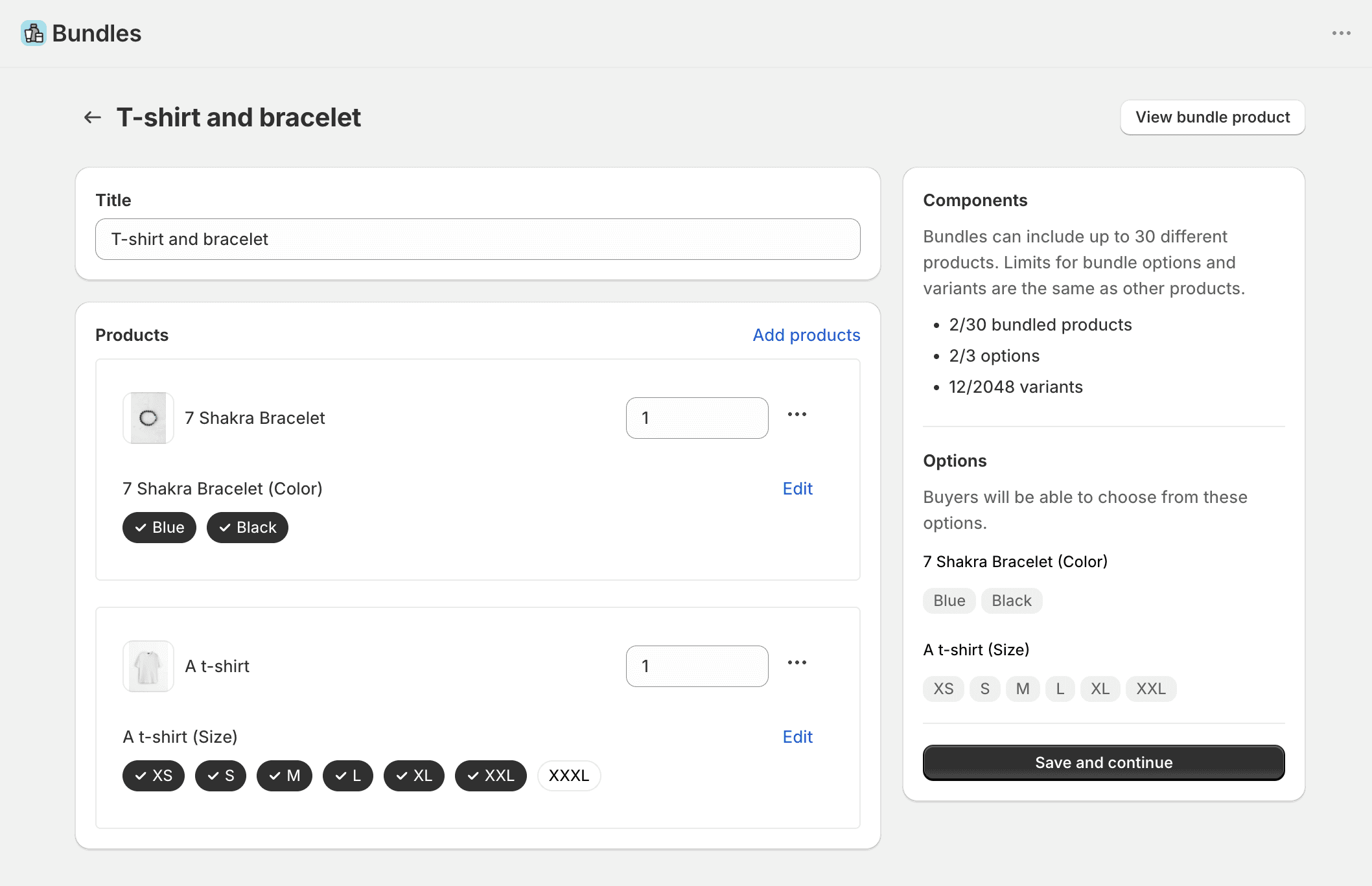
Shopify Bundles has been in the App Store since July 2023. You open Apps, click Create bundle, pick the products, set quantities, and Shopify creates a bundle product with its own page. Customers can still pick size or colour for each product inside the set. When the bundle sells, each component’s stock goes down, and when a component runs out, so does the bundle.
What you get for nothing:
It costs nothing. No trial clock and no plan to outgrow.
It’s first-party, with no third-party code in your theme. Shopify renders the bundle, Shopify tracks the inventory, Shopify owns the bug.
Multipacks are one click. Duplicate a product inside the bundle and you have a 3-pack that sells from that product’s own stock.
The bundle is a real product. It sits in collections and appears in search like anything else in your catalogue.
If you recognised your store in that list, install it and stop reading. Our step-by-step guide to creating bundles on Shopify covers the setup.
Where Shopify Bundles Stops
1. Customers can’t choose the products
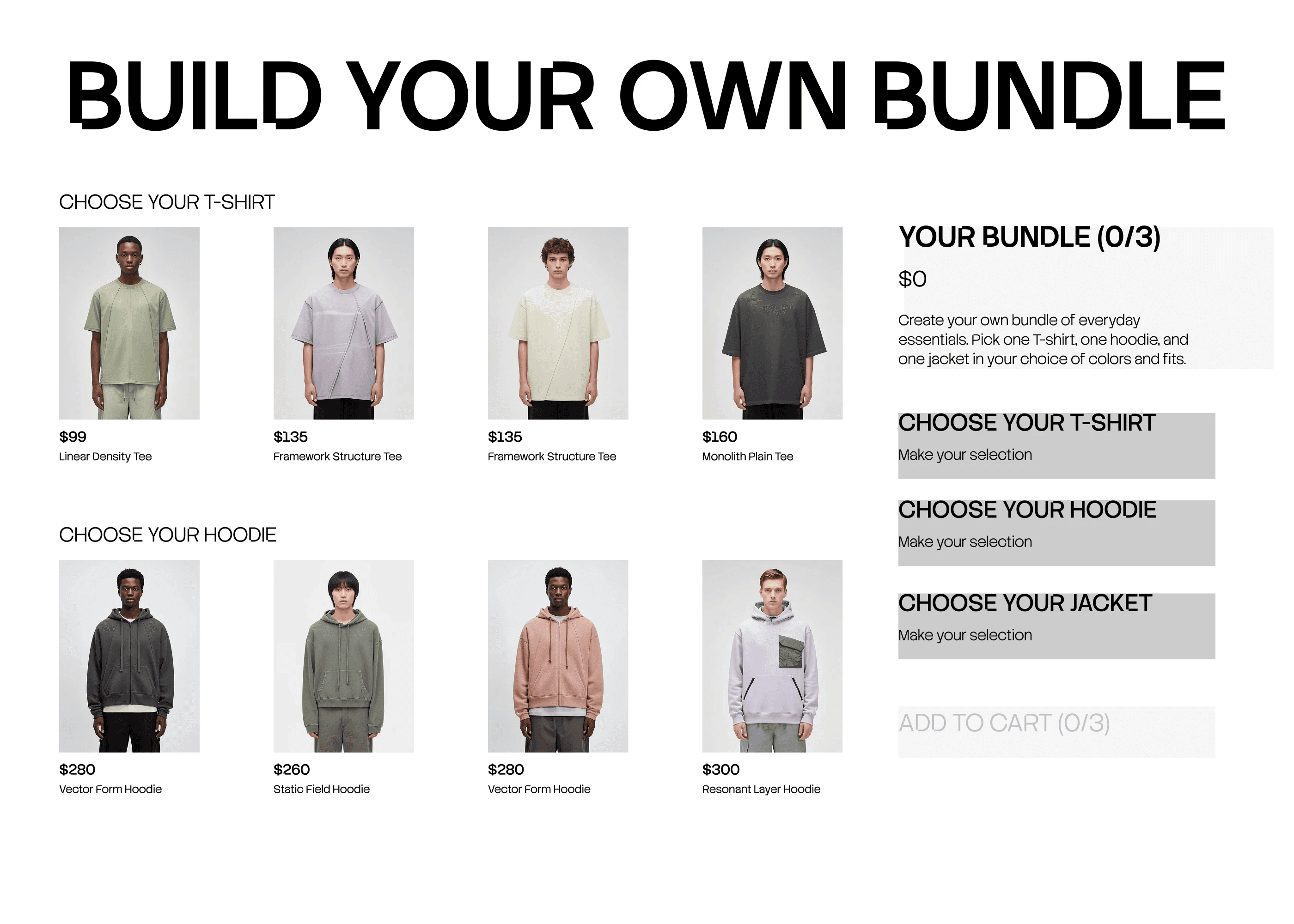
This is the big one. Shopify Bundles builds fixed sets: you decide every product, and the customer only chooses variants. There’s no “pick any 5 teas for $30,” no build-your-own box, no step-by-step builder. Shopify’s own documentation describes mix-and-match as a bundle type where “your customer composes the bundle,” but the native app doesn’t create them. That’s left to third-party apps.
Bundly is built around exactly this. A bundle pulls from specific products or from whole collections, and each slot gets a rule: exactly 3, at least 2, up to 4, between 1 and 6, or “optional.” Chain the slots into a multi-step flow (“pick a shirt, then trousers, then an accessory”) or lay them out as one mix-and-match grid. Curated sets are still there when you want them. We explain each rule and how to price a box in our build-your-own bundle guide.
2. Three options per bundle, hard cap
The native app stores every combination of component options as variants of the bundle product, so a bundle lives under the same limits as any Shopify product: 3 options and 2,048 variants. The variant ceiling is rarely a problem. The three options are.
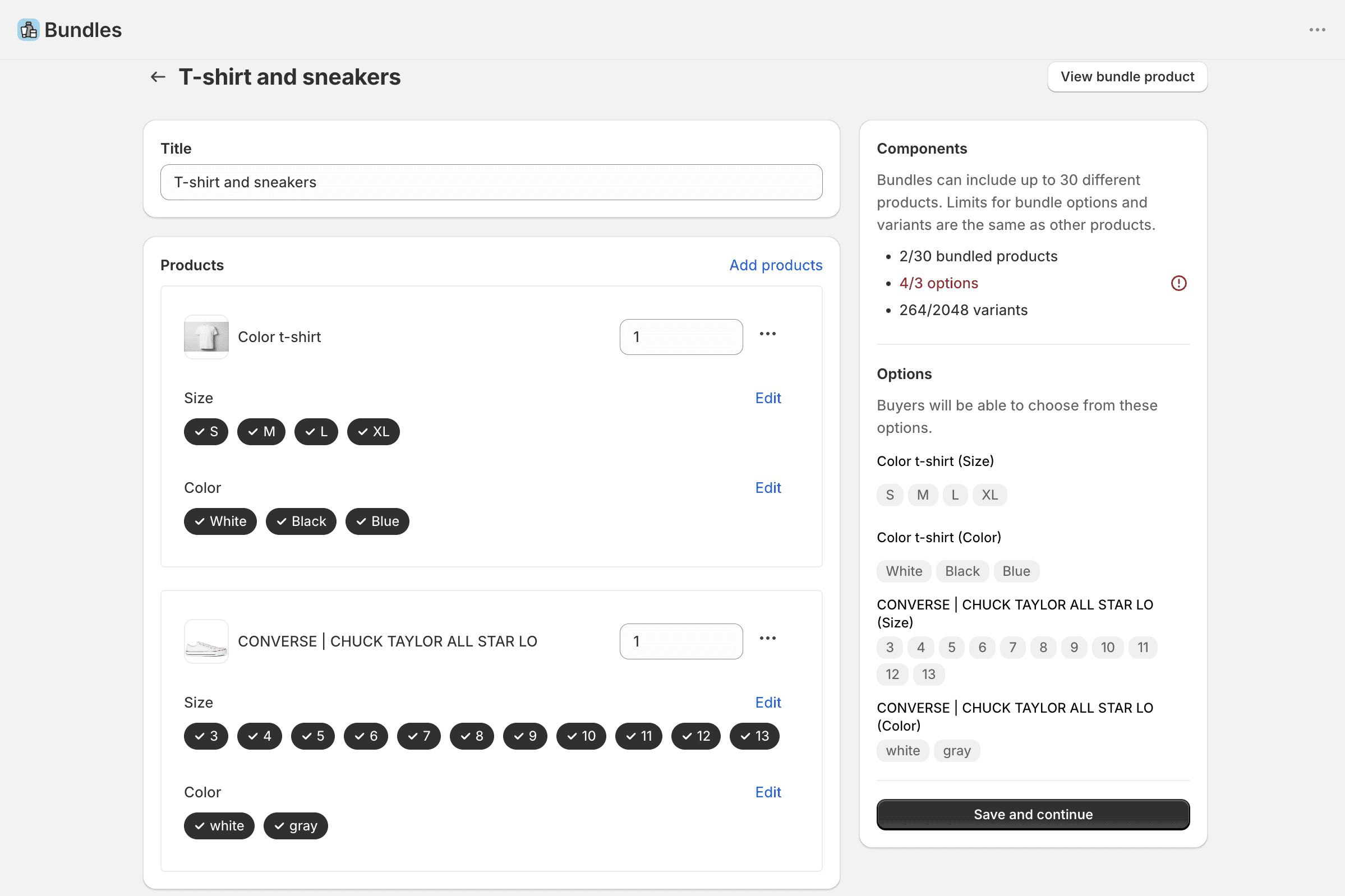
The app can combine options with matching names, so a t-shirt and a hoodie that must share one size count as one option. The cap bites when the customer needs to pick independently: a t-shirt in its own size and colour plus a pair of sneakers in their own size and colour is four options, and the app won’t save the bundle. Apparel and footwear stores hit this early, and the one-star reviews say so.
Bundly doesn’t enumerate bundle combinations as product variants. The bundle product has a single variant, customers pick each component’s variant on the bundle page, and the cart is built from the real component variants, so there’s no combination table to overflow. A bundle can have up to 128 configured components, each a product or a whole collection, and each product keeps every variant Shopify allows it.
3. The price is manual, and it doesn’t follow your products
In Shopify Bundles you type the bundle’s price yourself on its product page. There’s no “15% off the components” setting, and when you change a component’s price, the help centre is explicit: “the bundle price doesn’t update. You need to manually update the bundle price in your Shopify admin.” With five bundles that’s a chore. With fifty, or with seasonal repricing across a catalogue, it’s a spreadsheet.
Bundly prices a bundle four ways: percentage off, fixed amount off, a set price (“any 5 for $30”), or the plain component total. The first, second, and fourth are calculated from the components’ current prices at cart time, so a price change on a product flows into every bundle that contains it, in every market and currency you sell in.
4. No built-in component-page upsell
The native bundle has its own product page and can appear in collections and search, but there’s no built-in way to show it on the product pages of the items inside it, and it can’t recognise a bundle when a customer adds the same items one by one.
Bundly does both. Product page upsell shows the full bundle on each component’s product page. Cart detection, switched on per bundle, spots the components in the cart even when they were added separately and applies the bundle price.
5. No built-in tracking of bundle views and selections
Shopify Bundles shows bundle total sales, bundle orders, and top sellers in the app, and Shopify’s own reports cover sales, sessions, and product conversion. What the native app doesn’t add is bundle-specific storefront tracking: how many shoppers opened a bundle, which components they selected, and how many added the bundle to cart, recorded against the bundle rather than the product page.
Bundly records that. Sales reports per store and per bundle: orders, revenue, bundles’ share of your store’s orders and revenue, units, returns, and which products get picked most inside each bundle. Storefront reports: bundle views, component selections, add-to-cart rate, and a funnel from view to add-to-cart.
The smaller walls
Two smaller ones: bundle images don’t copy over from the components, so you rebuild the media yourself; and if you rename or delete a variant used in a bundle, the bundle drops to Draft until you edit it again.
Where Bundly Falls Short
It costs $29 a month, and there’s no free plan. If your fixed sets need none of the additional features (automatic pricing, product page upsells, cart detection, funnel reporting), the free app already does the job, and you’d be paying $348 a year for nothing.
The admin is English only. Shopify’s is available in 20 languages. Your customers see the storefront in their language; your team works in ours.
There’s setup. The bundle builder is rendered on your storefront by Bundly’s app blocks, so the first run walks you through adding them to your theme. It works with any theme, doesn’t edit your theme code, and the builder can be styled with CSS to match your store, but it’s a step the native app doesn’t have. And there’s no import from Shopify Bundles, so every bundle you move is rebuilt by hand.
67 reviews, not 571. A 4.9 average across dozens of stores, not thousands.
Shopify’s framework limits apply to Bundly too. No subscriptions or pre-orders, because Shopify’s bundles framework doesn’t allow selling plans on bundles. Bundly bundles can’t be published as products to Facebook, Instagram, Google, or TikTok. Shopify POS works only through cart detection. If any of those is a deal-breaker, $29 doesn’t fix it.
Free vs $29: The Break-Even
“Free” is a strong word, so here’s the arithmetic instead of a pitch. Extra revenue is not extra profit, so start from your margin: what’s left of a sale after cost of goods, payment fees, and shipping. This is the extra revenue Bundly has to bring in each month to cover $29:
At a 20% margin: about $145.
At a 30% margin: about $97.
At a 50% margin: about $58.
On a store doing $6,000 a month, $97 is a lift of about 1.6%.
Two rules for counting that revenue:
Count only revenue the switch created. A bundle order from a customer who would have bought everything at full price anyway isn’t extra.
Fixed sets alone don’t move it. A store that only sells fixed sets gains no revenue by switching, so the arithmetic never starts. A store that could offer “build your own 6-pack” and currently can’t is in a different position: there the comparison is a bundle versus no bundle.
For reference: in the median Bundly store, orders that include a bundle are about 40% larger than orders without one. How much your overall AOV moves depends on how many of your orders include a bundle. Run your own numbers with our AOV calculator, and then use the trial: build one bundle the native app can’t, put it on its components’ product pages, and read the storefront reports before you decide.
Switching From Shopify Bundles to Bundly
Nothing has to move in a hurry, and you don’t have to pick one app forever. Both apps can be installed on the same store, and your native bundles keep selling while you test.
Install Bundly and run the theme setup. It adds the bundle page template and app blocks; your theme code isn’t edited.
Build one bundle the native app can’t. A mix-and-match, or a set with products that break the 3-option cap. Don’t rebuild your existing fixed sets on day one.
Place a test order. Then look at the order lines and the inventory counts. This step tells you more about any bundle app than its feature list does.
Move the rest across, one bundle at a time. Shopify’s rule is that once an app assigns components to a bundle, only that app can manage them, so a native bundle can’t be edited in Bundly and neither app imports the other’s work. Rebuilding takes a few minutes per bundle.
Keep the URL. If the old bundle product has traffic or backlinks, either reuse its handle on the new bundle, or set the old bundle product to Draft first and then add a URL redirect under Content, Menus, View URL Redirects. The order matters: a redirect only takes effect once the old URL stops serving an active page.
Use the trial to check setup and ordering. Judging sales impact depends on how much traffic the bundle receives, so a quiet store may need longer than the trial to see a pattern. If Bundly doesn’t earn its place, your original bundles are untouched.
Which One Should You Pick?
Stay with Shopify Bundles if:
You decide every product in the set, and customer choice isn’t part of the plan.
Your products have simple options, so the 3-option cap won’t bite.
You can keep bundle prices updated by hand.
You want zero cost and zero third-party code.
Move to Bundly if:
You want mix-and-match, build-your-own, or a guided step-by-step builder.
You sell apparel, footwear, or anything else with many sizes and colours.
You reprice often, or sell in several markets and currencies.
You want the bundle offered on product pages and detected in the cart.
You want bundle views, selections, and add-to-carts tracked per bundle.
If you’re still choosing between apps in general, our comparison of the eight best Shopify bundle apps puts both of these next to Bundler, Kaching, Fast Bundle, Simple Bundles, Easy Bundles and BOGOS, including the apps with real free plans. For the tactics that move the same metric, see our guide to increasing average order value on Shopify.
FAQ
Is the Shopify Bundles app free?
Yes, completely. Shopify Bundles is built by Shopify, free on every plan, with no paid tier and no order limits. It creates fixed bundles and multipacks with real-time inventory, capped at 3 options per bundle.
What are the limitations of the Shopify Bundles app?
From Shopify’s documentation: customers can choose variants but not which products go in the bundle; a maximum of 3 options per bundle, with variants under Shopify’s normal 2,048 product limit; up to 30 components; and bundle prices don’t update when component prices change. The app also has no product page upsell, no cart detection, and no built-in tracking of bundle views and component selections.
Can Shopify Bundles do mix-and-match?
No. Customers can pick a variant, like size or colour, of the products you selected, but they can’t pick the products themselves. For “choose any 5 for $30” you need a third-party app such as Bundly.
Does Shopify Bundles still have a 100-variant limit?
No. Shopify raised the product variant limit to 2,048 in October 2025, and the Bundles app follows the same limit: 3 options and 2,048 variants per bundle. The 3-option cap is the one that bites, because each product that needs its own size or colour choice uses one option. Bundly avoids it by giving the bundle product a single variant and letting customers pick each component’s variant on the bundle page.
Is Bundly worth $29 a month if Shopify Bundles is free?
Only if you’d use what the free app lacks: customer choice, automatic pricing, product page upsells, cart detection, or funnel reporting. At a 30% contribution margin, $29 needs about $97 a month of additional revenue attributable to the switch to break even, which is a small lift on most stores. If your fixed sets need none of those features, stay on the free app.
Do Bundly and Shopify Bundles handle inventory the same way?
Yes. Both build on Shopify’s bundles framework, so the bundle is a container and both use component inventory rather than maintaining independent bundle stock. There’s no separate bundle inventory to sync or drift. Keep inventory tracking on for every component, because Shopify’s availability calculation skips untracked components and components allowed to sell when out of stock.
Can I use Shopify Bundles and Bundly at the same time?
Yes. Both can be installed on one store and they create separate bundle products. Each bundle belongs to the app that created it, so a native bundle can’t be edited in Bundly, and neither app imports the other’s bundles.
Does either app work with subscriptions?
No. Shopify’s documentation states that bundles built on its bundles framework aren’t compatible with purchase options, which covers subscriptions, pre-orders, and try-before-you-buy. That applies to Shopify Bundles and to Bundly.
Does Shopify Bundles work with Shopify POS?
Shopify’s page for the app says its bundles must use the Online Store or headless storefronts, while Shopify’s general bundles page lists POS as a supported channel. Test it before you rely on it. Bundly doesn’t support POS natively; it works there through cart detection, with native support on our roadmap.