

How to Increase Average Order Value on Shopify (7 Ways That Work)
What is Average Order Value?
Average order value (AOV) is the amount your customers spend per order. You find it by dividing total revenue by total number of orders. If your store made $10,000 last month from 200 orders, your AOV is $50.
That number matters more than ever. Customer acquisition costs keep climbing year over year, which means getting someone to your store is expensive. But the sale doesn't have to stay the same size. The fastest way to grow revenue without spending more on ads is to get each visitor to spend a little more per order.
You don't need to raise your prices or drive more traffic. You just need to give customers a good reason to add more to their cart. Here are 7 proven ways to increase average order value on Shopify.
1. Sell Product Bundles
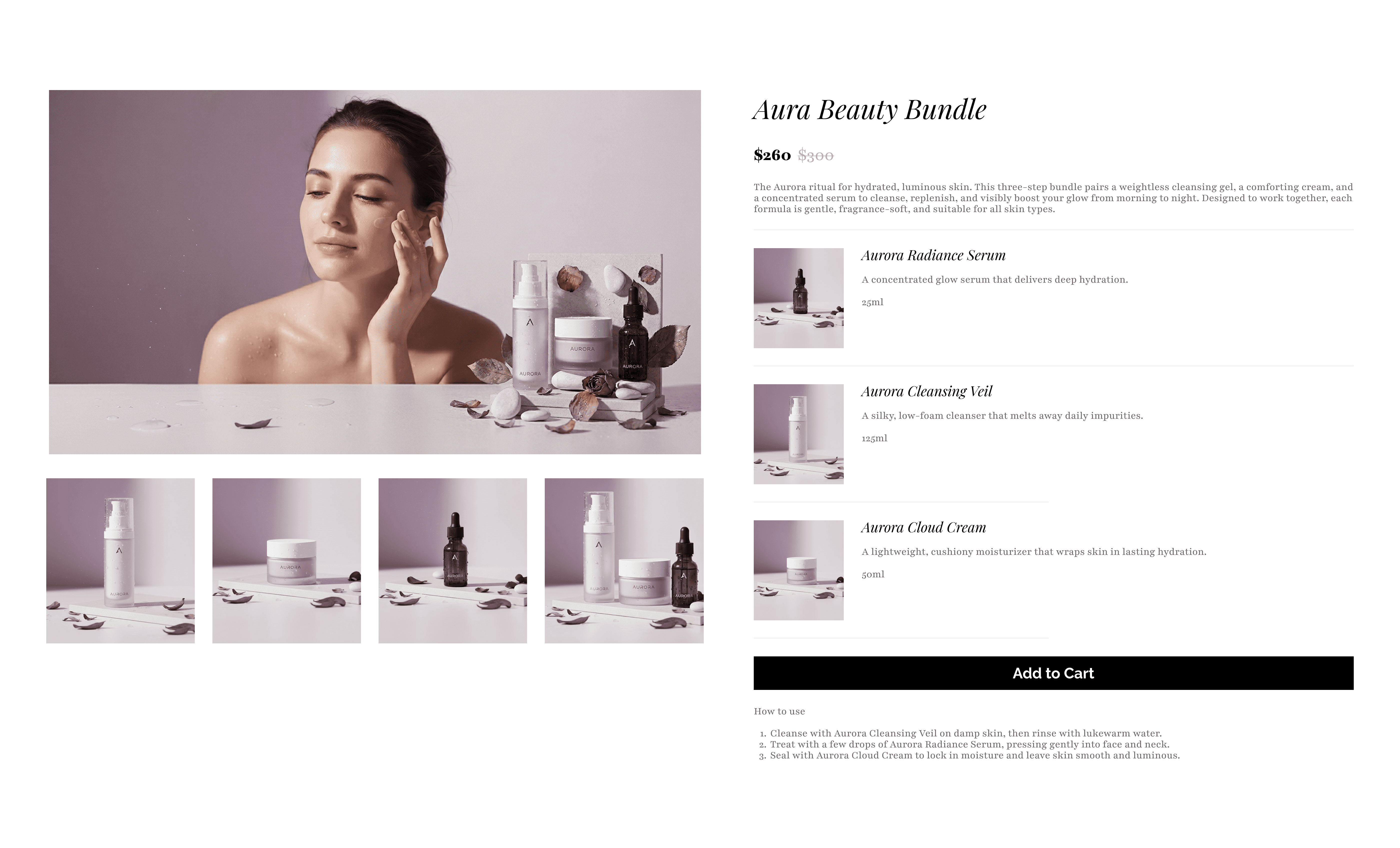
Bundles are probably the most effective way to raise AOV. When you group products together and sell them as a set, customers buy more items in one go, and they feel good about it because they're getting a better deal than buying each item separately.
The numbers back this up. Stores using Bundly see an average order value increase of 12.3%, and across all Bundly merchants, over $20 million worth of bundles have been sold.
Why do bundles work so well? They make the decision easier. Instead of browsing 30 products and picking one, the customer sees a set that makes sense together. The thinking is already done, the price is already better, and all they have to do is click "add to cart."
Types of Bundles That Work
Not all bundles look the same, and the best type for your store depends on what you sell.
Mix and match. You pick a group of products and the customer chooses which ones go in the bundle. A tea shop might say "pick any 5 teas for $30," or a sock brand might offer "choose 4 pairs, get 1 free." The customer feels in control, and they end up with more items than they planned on buying.
Curated sets. You decide what goes in the bundle and the customer adds the whole thing in one click. A skincare store might sell a "Morning Routine Kit" with a face wash, serum, and moisturizer. The customer doesn't have to figure out which products work together. You already did that for them.
Multi-step builders. These walk the customer through choices one at a time. Step 1: Pick a shirt. Step 2: Pick trousers. Step 3: Pick an accessory. By the end, they have a full outfit at a bundled price. Complex purchases feel simple, and the customer leaves with more than they came for.
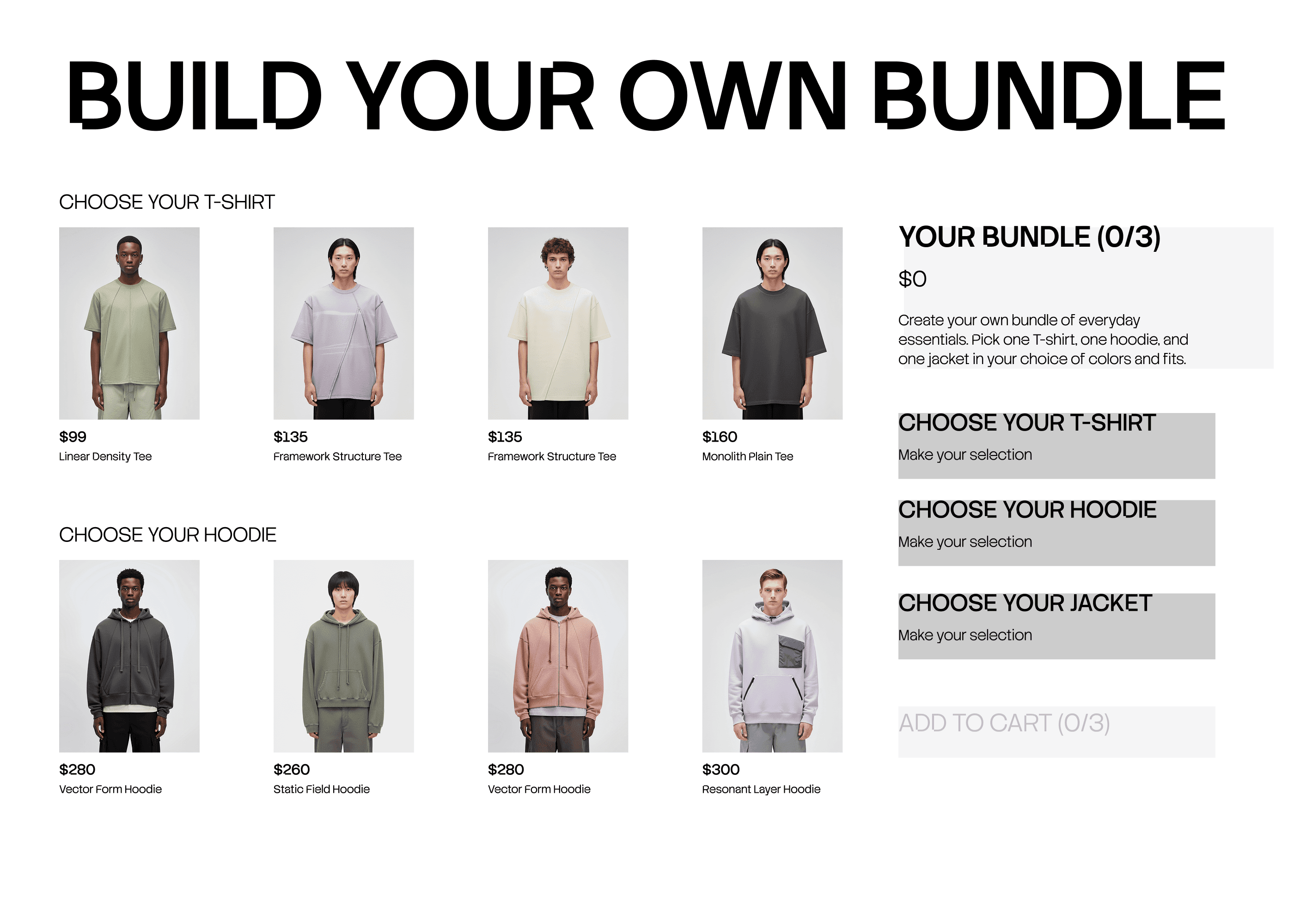
How to Set Up Bundles on Shopify With Bundly
Bundly is a bundle builder app for Shopify that supports all four bundle types above. Setup takes about five minutes, no code needed:
Install Bundly from the Shopify App Store. You get a 14-day free trial.
Open Bundly from your Shopify Admin and click Create Bundle.
Choose your bundle type: fixed or dynamic.
Select the products or collections to include.
Set pricing: percentage off, fixed amount off, or a flat set price.
Customize the look so it matches your store.
Publish.
For the full walkthrough with screenshots, see our step-by-step guide to creating product bundles on Shopify.
Not sure Bundly is the right fit? We tested the best Shopify bundle apps side by side, including Shopify's free app.
Two features worth calling out for AOV specifically:
Product page upsell. Bundly shows the bundle right on the individual product page. Someone looking at a face wash sees the full skincare set below it. They came for one item, now they see the set. Many of them upgrade.
Auto-merge. If a customer adds bundle items to their cart one by one — without going through the bundle page — Bundly detects it and applies the bundle discount automatically. The customer saves money they didn't even know they could save, and you still get the bigger order.
2. Set a Free Shipping Threshold
People hate paying for shipping. 39% of shoppers abandon their cart because of shipping costs. But here's the other side of that: according to the same Baymard research, most shoppers will add extra items to their cart just to qualify for free shipping.
A free shipping threshold does two things at once: it reduces cart abandonment, and it raises AOV.
Here's how to set yours: look at your current average order value and add 15–25% on top. If your average order is $50, set free shipping at $60 or $65. That's close enough that customers feel they can reach it by adding one more item, but far enough above your current average that it actually moves the number.
Put a banner at the top of your store ("Free shipping on orders over $65") and add a progress bar in the cart that shows how close they are. "You're $12 away from free shipping!" is surprisingly motivating.
One thing we've noticed with Bundly merchants: if your bundles are priced right at or just above the free shipping threshold, customers get two incentives at the same time: the bundle deal and free shipping. That combination is hard to pass up. Bundly also lets you offer free shipping on bundles only, which makes the bundle even more appealing compared to buying items individually.
3. Cross-Sell on Product and Cart Pages
Cross-selling means showing a related product that goes with what the customer is already buying. If they're looking at a phone, you show them a phone case. If they're buying coffee beans, you show them a grinder. It works because the suggestion feels helpful, not pushy. The customer is already in buying mode and you're just pointing out something they might need.
The best places to cross-sell:
On the product page. Below the main product, show a small section of items that pair well with it. Keep the suggestions relevant. A random product from a different category won't work, but a matching item from the same world will.
On the cart page. Before checkout, show one or two add-ons. Keep them small, affordable, and easy to understand. If someone has to read a long description or check sizing, they'll skip it. A $12 accessory that's obviously useful gets added; a $60 item that needs research doesn't.
After checkout. The confirmation page and follow-up email are both good spots for a "you might also like" suggestion. Post-purchase offers tend to get much higher engagement than standard email campaigns because the customer just bought from you. They're warm.
Bundly's product page Special Offers widget works as a natural cross-sell here. It shows a full bundle on any individual product page, which is essentially saying "this item is even better as part of this set."
4. Upsell to Larger Sizes or Premium Versions
Upselling means encouraging the customer to buy a larger or more expensive version of what they're already considering. If someone's about to buy one bag of coffee, show them a 3-pack that costs less per bag. If they're looking at the standard version, show them the premium side by side and highlight what makes it worth the extra cost.
Volume-based upselling is especially effective for consumable products like coffee, candles, supplements, and skincare. Anything people use up and reorder. Show the per-unit price at each level so the savings are obvious:
1 bag — $15
3 bags — $36 (save 20%)
6 bags — $60 (save 33%)
When people can see the math, they buy more. The jump from 1 to 3 feels small but the savings feel big.
5. Offer a First-Purchase Incentive Tied to a Minimum Spend
A discount for first-time buyers is one of the most common tactics in e-commerce, and it works. It gets hesitant shoppers off the fence. But if you just give 15% off with no conditions, most people buy one cheap item at a discount and leave. That actually lowers your AOV.
The fix: tie the discount to a minimum cart value. "15% off your first order over $50." Now the customer has to spend at least $50 to unlock the deal, which pushes AOV up instead of down. The discount is still appealing enough to convert someone, but the minimum makes sure the order is worth it for you.
The email signup version works the same way: "Join our list and get $10 off orders over $60." You get the email address and a higher first order, and they become a customer you can market to later.
One warning: don't make first-purchase discounts a permanent fixture. If customers learn there's always a discount available, they stop buying at full price. Use it as a one-time welcome, not a regular habit.
6. Start a Simple Loyalty Program
Repeat customers spend 67% more than new ones after shopping with you for a sustained period. If you can get someone to come back, they almost always spend more, and a loyalty program gives them a reason to return.
You don't need anything complicated. The simplest version is a points-per-dollar system: spend $1, earn 1 point. Accumulate enough points and redeem them for a discount, a free product, or early access to a new launch.
A tiered version can work well for stores with a range of price points — Silver, Gold, Platinum, each unlocking better perks. Customers spend more to reach the next level because the rewards get more interesting.
Loyalty programs also pair well with bundles. If you offer double points on bundle purchases, customers have an extra reason to buy the set instead of a single item. That stacks well.
The key is keeping the program easy to understand. If a customer has to do math or read fine print to figure out how it works, they won't bother. "Spend $100, get $10 back" is clear. A 47-step points redemption process is not.
7. Use Urgency and Limited-Time Offers (Honestly)
Urgency works because people are more likely to buy now when they know the deal won't be around later. A little time pressure turns "maybe" into "yes." There are a few ways to do this well:
Seasonal bundles with a real end date. A Valentine's Day gift set that disappears on February 15th. A summer skincare bundle that's only available in July. The deadline is built into the calendar, so it feels natural, not manufactured.
Countdown timers on limited-time pricing. If you're running a bundle deal for one week, put a timer on the page. People who see the clock ticking are more likely to buy today rather than "come back later" (which usually means never).
Limited quantity offers. "Only 50 sets available" creates scarcity. When people believe something might run out, they act faster.
Flash sales tied to cart value. "20% off orders over $75 — today only." This pushes AOV up and creates urgency at the same time.
The one rule that matters: only use urgency when it's real. Fake countdown timers that reset every time someone visits your site destroy trust. If the deal ends Friday, say so. If it doesn't, don't pretend. Customers notice, and they stop believing you.
How to Calculate Your Average Order Value

If you're going to work on improving this number, you need to know where it stands right now.
AOV = Total Revenue ÷ Total Number of Orders
If your store made $8,000 from 160 orders last month, your AOV is $50. You can find this in your Shopify Admin under Analytics → Overview. Shopify calculates it automatically.
Or put your numbers into our free Shopify AOV calculator to see how your store compares with your industry.
But the overall number only tells part of the story. To find real opportunities, break it down:
By traffic source. Which channel sends the customers who spend the most? Organic search might bring higher-value customers than social media, or the other way around. Knowing this helps you invest your time in the right place.
By new vs returning customers. Returning customers almost always have a higher AOV. If there's a big gap between the two, focus on getting first-time buyers to come back.
By product category. Some categories naturally produce bigger orders. If your home goods section has a $90 AOV and your accessories section has a $25 AOV, that tells you where bundles or upsells will have the most impact.
By device. Desktop shoppers tend to spend more than mobile shoppers. If your mobile AOV is significantly lower, it might mean your mobile experience has friction that's costing you money.
Measure before you start any of the tactics in this article, then check again after two to four weeks. If the number moved, you know what's working.
Average Order Value Benchmarks by Industry
It helps to know what "normal" looks like for stores similar to yours. These ranges come from Shopify's industry benchmarks and various e-commerce reports:
Industry | Typical AOV Range |
|---|---|
Beauty and skincare | $60 – $90 |
Food and beverage | $70 – $85 |
Fashion and apparel | $100 – $200 |
Home and furniture | $110 – $265 |
Luxury and jewelry | $250 – $330 |
B2B and wholesale | $500+ |
These are averages across many stores. Your number depends on your product prices, customer mix, and how many AOV tactics you already have in place.
If you're below the benchmark for your industry, that's not bad news. It means there's room to grow. Start with the highest-impact tactic (product bundles or a free shipping threshold) and measure the change over a few weeks.
FAQ
What is the formula for average order value?
AOV = total revenue ÷ total number of orders. If your store made $6,000 from 100 orders, your AOV is $60.
How do product bundles increase average order value?
Bundles group multiple products into one offer at a price lower than buying each item separately. The customer spends more per order because they're buying several items at once. Bundly merchants see a 12.3% average AOV lift.
What is a good free shipping threshold?
Take your current AOV and add 15–25% on top. If your AOV is $50, set free shipping at $60–$65. Close enough to feel reachable, far enough above your average to actually move the number.
What is the difference between cross-selling and upselling?
Cross-selling suggests a different product that goes with what the customer is buying (a phone case with a phone). Upselling suggests a bigger or better version of the same product (a 3-pack instead of a single unit).
How much can bundles increase my average order value?
It varies by store, but across all Bundly users the average increase is 12.3%. Stores with well-structured mix-and-match or volume reward bundles often see more.
Does Bundly work with Shopify Markets and B2B?
Yes. Bundly supports every Shopify Market, B2B catalogue, and currency you sell in. Your bundles work wherever your store does.
Can I increase average order value without giving discounts?
Yes. Curated bundles at a set price, product page upsells, and cross-sells all raise order value without requiring a discount. Bundly lets you set a flat bundle price instead of a percentage off, so you keep full control of your margins. Not sure where your margins stand? Run your numbers through our Shopify profit margin calculator.