
Shopify Profit Margin Calculator - Free Tool
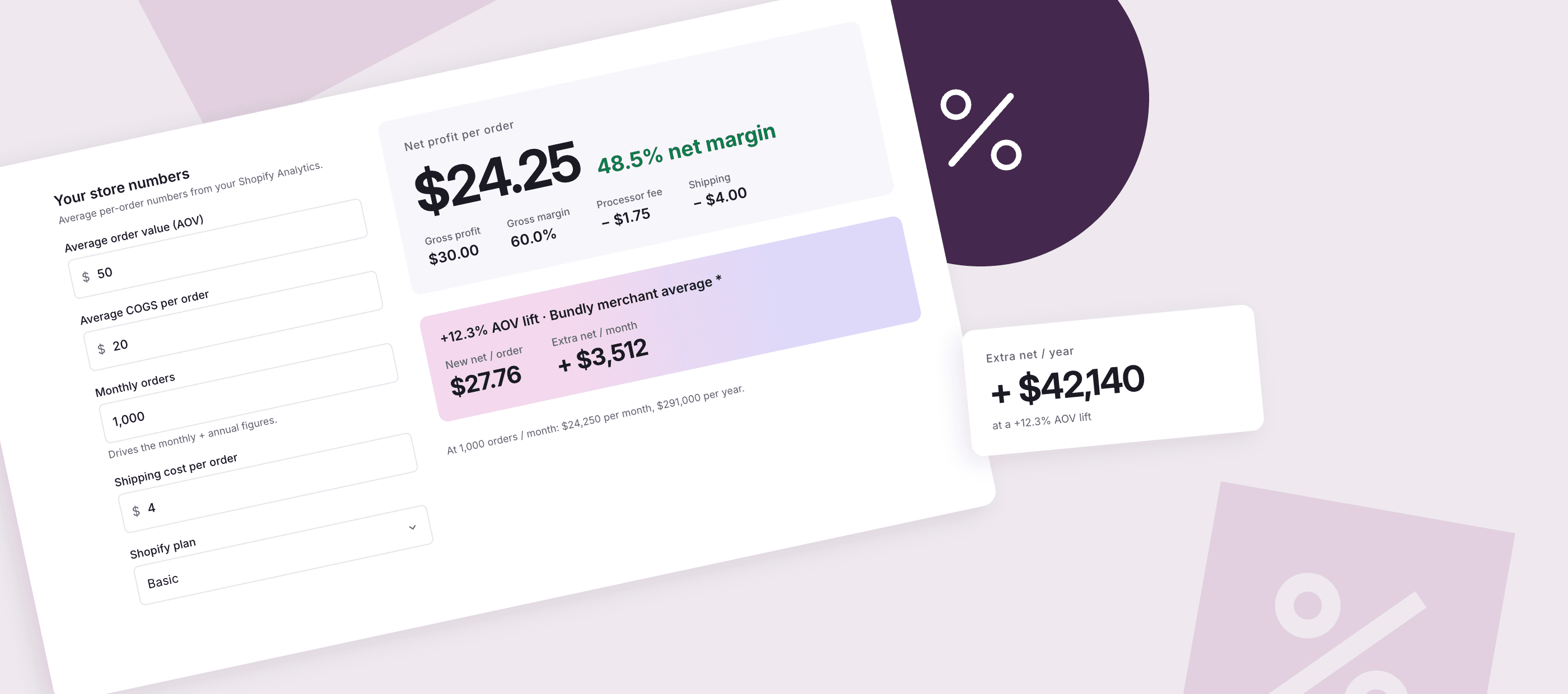
Work out your gross margin, net margin, and net profit per order in seconds. Pick your Shopify plan to bake in the right transaction fees, then see how a small AOV lift from bundles would change your monthly and annual bottom line.
Your store numbers
Average per-order numbers from your Shopify Analytics.
Shopify fees
US plans, USD.
- Gross profit
- $30.00
- Gross margin
- 60.0%
- Markup
- 150%
- Processor fee
- −$1.75
- Shipping
- −$4.00
What a bundle-driven AOV lift would do
Same-margin growth: COGS scales with AOV. Bonus over linear comes from your processor fixed fee + shipping not scaling.
| AOV lift | New AOV | New net / order | Extra net / month | Extra net / year |
|---|---|---|---|---|
| +5% | $52.50 | $25.68 | +$1,427 | +$17,130 |
| +10% | $55.00 | $27.11 | +$2,855 | +$34,260 |
| +12.3%Bundly merchant average* | $56.15 | $27.76 | +$3,512 | +$42,140 |
| +20% | $60.00 | $29.96 | +$5,710 | +$68,520 |
What is Profit Margin?
Profit margin is the percentage of revenue you keep after costs. Two flavors matter on Shopify:
Gross margin is what's left after the cost of goods. If you sell a t-shirt for $50 and it costs you $20 to make, your gross margin is 60%. This is the number that tells you whether your pricing makes sense at all.
Net margin in the context of this calculator is what's left from each order after the variable per-order costs: payment processing fees, the fixed per-transaction fee, the Shopify surcharge if you use a third-party processor, and shipping. On the same $50 t-shirt at Shopify Basic with $4 shipping, your per-order net lands at $24.25 (48.5%), not $30 (60%).
Worth flagging up front: this is per-order math, not full business net margin. The calculator doesn't try to model your app subscriptions, ad spend, returns, fraud, payroll, or rent, because those don't scale one-to-one with each sale. Treat the per-order net as your contribution toward all those fixed costs. If your fixed costs are small, it's close to your real bottom line. If they're large, your true net is lower.
That said, plenty of merchants track gross margin religiously and never look at this per-order net at all. In the $50-t-shirt example, the Shopify fee plus shipping eats $5.75 per order, or 11.5% of revenue, which is the gap between a 60% gross margin and a 48.5% per-order net. Across thousands of orders a month, that's the difference between a healthy P&L and a thin one.
The Profit Margin Formula
Three formulas, all useful for different things:
Gross margin = (Price − COGS) ÷ Price
A $50 product with $20 COGS has a gross margin of $30 ÷ $50 = 60%.
Per-order net margin = (Price − COGS − Fees − Shipping) ÷ Price
The same product on Shopify Basic with Shopify Payments costs you 2.9% + $0.30 in fees ($1.75) and $4 shipping. Net = $50 − $20 − $1.75 − $4 = $24.25, or 48.5%. Note: this is the per-order figure. It excludes app subscriptions, ad spend, returns, payroll, and other fixed costs that don't scale per sale.
Markup = (Price − COGS) ÷ COGS
Same product: $30 ÷ $20 = 150% markup. Markup is what your supplier wants to know. Margin is what your accountant wants to know.
The calculator above runs all three in real time. Plug your numbers in and watch the per-order, monthly, and annual totals update.
How Shopify Fees Affect Your Margin
Shopify charges two things that touch your margin: a monthly subscription (not a per-order cost, so the calculator ignores it) and a per-transaction fee that comes out of every sale.
If you use Shopify Payments (Shopify's built-in card processor), the rate depends on your plan:
Plan | Card rate | Fixed fee | Third-party surcharge |
|---|---|---|---|
Basic | 2.9% | $0.30 | 2.0% |
Grow | 2.7% | $0.30 | 1.0% |
Advanced | 2.5% | $0.30 | 0.6% |
Plus | ~2.25% (negotiated) | $0.30 | 0.20% |
If you use a third-party processor like Stripe or PayPal instead of Shopify Payments, you pay your processor's fee (Stripe's standard US online-card rate is 2.9% + $0.30; international cards, AmEx, PayPal, and negotiated enterprise rates differ) plus the Shopify surcharge from the table above. So a Basic plan merchant on Stripe's standard rate pays roughly 4.9% + $0.30 per transaction, not the 2.9% Shopify Payments would have charged. The "Use Shopify Payments?" toggle on the calculator surfaces this; the processor fields are editable to match whatever your actual processor charges.
A few practical notes:
The fixed $0.30 hurts more on small orders. On a $10 order, that $0.30 is 3% of revenue all by itself. On a $100 order, it's 0.3%. Higher AOV is worth more per dollar of fee than lower AOV.
Shopify's plan rates are US numbers. Canadian, UK, and EU pricing pages list different rates, so this calculator is US-only for now.
Plus rates vary by merchant. The 2.25% figure is the public ballpark; if you're on Plus and know your real rate, edit the field directly.
What Counts as a Good Margin on Shopify?
Knowing your own margin is one thing. Knowing whether it's any good is another, and there's no single public source that breaks margin down by category for online stores in a way that's worth quoting. The numbers float around in trade press, app vendor blog posts, and paywalled Statista charts that all disagree by 10+ points.
For an order-of-magnitude anchor, Shopify's own retail blog cites online retail at roughly 45% gross margin on average and brick-and-mortar net margin at 0.5% to 4.5% (Shopify, How to Calculate Profit Margin). That's the broad benchmark. Online stores tend to land higher than physical retail on net because they avoid the rent and staffing costs.
The more useful comparison is your own store six months ago, not an external category average. Drop your numbers into the calculator above each month and watch the trend. A 2-point net-margin lift quarter over quarter beats hitting some published benchmark, because the published benchmarks are wrong half the time anyway.
If your margin's been flat or sliding, the question is usually one of three things: are you discounting too aggressively, has COGS crept up, or is your shipping cost eating you alive? The calculator isolates each one.
How to Lift Your Margin Without Raising Prices
Raising prices works, but most merchants resist it because conversion drops. There are easier wins:
Sell bundles. A bundle is the same SKU margin applied to a bigger ticket. If your gross margin is 60% on a $50 product, it's still 60% on a $90 bundle. The absolute dollars per order go up, but your per-order processor fee and shipping don't scale at the same rate, so net margin actually improves. Stores using Bundly see an average AOV lift of 12.3% after install. The calculator above lets you plug in your numbers and see what that lift would do to your net. Our step-by-step guide shows how to create product bundles on Shopify. To pick an app first, see the best bundle apps for Shopify, compared on pricing model and bundle types.
Switch to Shopify Payments. If you're on a third-party processor, Shopify takes an extra surcharge on top of whatever your processor charges. Switching to Shopify Payments removes that surcharge entirely. The surcharge ranges from 2.0% on Basic down to 0.20% on Plus, so the savings depend on both your plan and your current processor's rate. On Basic with Stripe, removing the 2% surcharge saves roughly $1 per $50 order. Toggle "Use Shopify Payments" on and off in the calculator to see the exact dollar impact on your store.
Negotiate your COGS at scale. Once you're consistently selling 1,000+ units a month, your supplier has reason to talk about volume pricing. The lift in gross margin depends heavily on where you started: at a thin 25% gross margin (COGS = 75% of price), a 5% COGS cut adds about 4 points of gross margin (15% relative lift). At a fat 60% gross margin (COGS = 40% of price), the same 5% COGS cut adds 2 points (3% relative lift). Skinnier-margin businesses get bigger headline gains from COGS work; that doesn't make the work less worthwhile for higher-margin stores, just less dramatic.
Combine multiple SKUs into one shipment. A bundle is often one box even when it contains two or three products. Heavier or larger bundles can push you into a higher shipping bracket, so it isn't always free, but in practice shipping cost rarely scales one-for-one with the revenue increase. The result is more revenue per fulfilment, and the math stacks with whatever margin lift the bundle itself gives.
Move slow inventory through bundles. A product that sits in your warehouse costs you holding fees and ties up capital. Pairing it with a bestseller in a bundle moves it without a discount big enough to wreck the margin.
For the full playbook on bundles specifically, including the seven tactics most Shopify stores use to lift AOV, read How to Increase Average Order Value on Shopify.
Most of these levers start from your average order value. Check yours in seconds with the free Shopify AOV calculator.
FAQ
How do you calculate profit margin on Shopify?
Gross margin is (Selling price minus COGS) divided by selling price. The per-order net version is the same thing minus your processor fee, the fixed transaction fee, the Shopify surcharge if you're on a third-party processor, and shipping, all divided by selling price. The calculator above does the arithmetic for any plan and either Shopify Payments or a third-party processor.
What is a good profit margin for a Shopify store?
For full-business net margin (after all costs including ads, app subs, payroll, and overhead), high single digits to mid teens is typical for healthy DTC stores; 20% is excellent. The per-order net you see in this calculator runs higher because it only subtracts variable per-order costs (payment fees and shipping), so don't compare it directly to those benchmarks. Track it month over month in your own store and watch the trend.
What's the difference between gross margin and net margin?
Gross margin only subtracts the cost of the product itself (COGS). Full business net margin subtracts everything else: payment processing, shipping, app subscriptions, ad spend, returns, fraud, payroll, rent. This calculator computes a per-order version of net (gross minus payment fees minus shipping), which is the slice that varies with each sale. It's a useful intermediate metric (your "order contribution"), but it isn't the bottom-line net margin you'd report to investors.
What is the formula for markup?
Markup = (Selling price minus COGS) divided by COGS. A product with $20 COGS sold at $50 has a 150% markup. People confuse markup with margin all the time. The same product has a 60% gross margin (60% of revenue is profit) and 150% markup (the markup is 1.5x the cost). Both are correct; they answer different questions.
What are Shopify's transaction fees?
If you use Shopify Payments, the per-transaction rate ranges from 2.9% + $0.30 (Basic) down to ~2.25% + $0.30 (Plus). If you use a third-party processor, you pay your processor's fee plus a Shopify surcharge of 2.0% / 1.0% / 0.6% / 0.20% by plan. The calculator above bakes both options in.
How do I increase my profit margin?
Three levers, in order of effort: switch to Shopify Payments if you're not already (removes Shopify's third-party surcharge, which ranges from 2.0% on Basic down to 0.20% on Plus; exact impact also depends on your current processor's rate), sell bundles to raise AOV at the same gross margin (Bundly merchants average +12.3%), and negotiate volume pricing on COGS once you have the order count to justify it.